Get Started
This guide walks you through running auxilia locally with Docker Compose.
Prerequisites
- Docker and Docker Compose
- At least one LLM API key (Anthropic, OpenAI, Google, or DeepSeek)
1. Clone the repository
git clone https://github.com/keurcien/auxilia.git
cd auxilia
2. Configure environment
Copy the example environment file:
cp .env.example .envThe minimum configuration you need is a database URL, a JWT secret, an MCP encryption salt, and at least one LLM API key:
# Database
DATABASE_URL=postgresql+psycopg://auxilia:auxilia@localhost:5432/auxilia

# Redis
REDIS_HOST=localhost
REDIS_PORT=6379

# At least one LLM provider
ANTHROPIC_API_KEY=sk-ant-...
OPENAI_API_KEY=sk-...
GOOGLE_API_KEY=...
DEEPSEEK_API_KEY=...
OPENROUTER_API_KEY=...
XIAOMI_API_KEY=...
METAAI_API_KEY=...

# Auth
JWT_SECRET_KEY=change-me-in-production
COOKIE_SECURE=false
FRONTEND_URL=http://localhost:3000

# MCP API-key encryption
SALT=changeme

# Backend URL — used by the Next.js proxy (server-side only)
BACKEND_URL=http://localhost:8000
Optional:
# Google OAuth sign-in
GOOGLE_CLIENT_ID=
GOOGLE_CLIENT_SECRET=
GOOGLE_REDIRECT_URI=http://localhost:8000/auth/google/callback
AUTH_GOOGLE_EXCLUSIVE=false    # set to true to disable password signup

# Langfuse observability (see /deploy/langfuse)
LANGFUSE_PUBLIC_KEY=pk-...
LANGFUSE_SECRET_KEY=sk-...
LANGFUSE_BASE_URL=https://cloud.langfuse.com
LANGFUSE_TIMEOUT=15

# Slack integration (see /deploy/slack)
SLACK_SIGNING_SECRET=
SLACK_BOT_TOKEN=xoxb-...

# Tuning & debugging
LOG_LEVEL=INFO                 # set to DEBUG for verbose logs (MCP traces, etc.)
RECURSION_LIMIT=100            # max LangGraph steps per agent invocation
Code-execution sandboxes are not environment variables — they are added later in the UI (step 7).
3. Start the stack
The fastest way to get everything running with hot reload:
make devThis starts PostgreSQL, Redis, the FastAPI backend (with Alembic migrations) and the Next.js frontend in parallel.
Equivalent individual commands:
make dev-stack       # docker compose -f docker-compose.dev.yml up (postgres, redis)
make dev-backend     # alembic upgrade head + uvicorn with reload
make dev-frontend    # next dev
For production (Docker Compose):
make build           # or: docker compose build
make up              # docker compose up -d
4. Create the first admin account
Open http://localhost:3000 . The first account you create becomes the workspace admin. After that, new accounts require an invite from an admin.
5. Enable a model
Go to Settings → Models and enable at least one model of the provider you configured. Starring one makes it the workspace default, preselected in every chat.
6. Add an MCP server
Navigate to MCP Servers in the sidebar, click Add MCP server, and either:
- Click Add on one of the official servers (Notion, Linear, GitHub, HubSpot, BigQuery, DeepWiki, …), or
- Click Add a custom server to register any remote MCP server by URL.
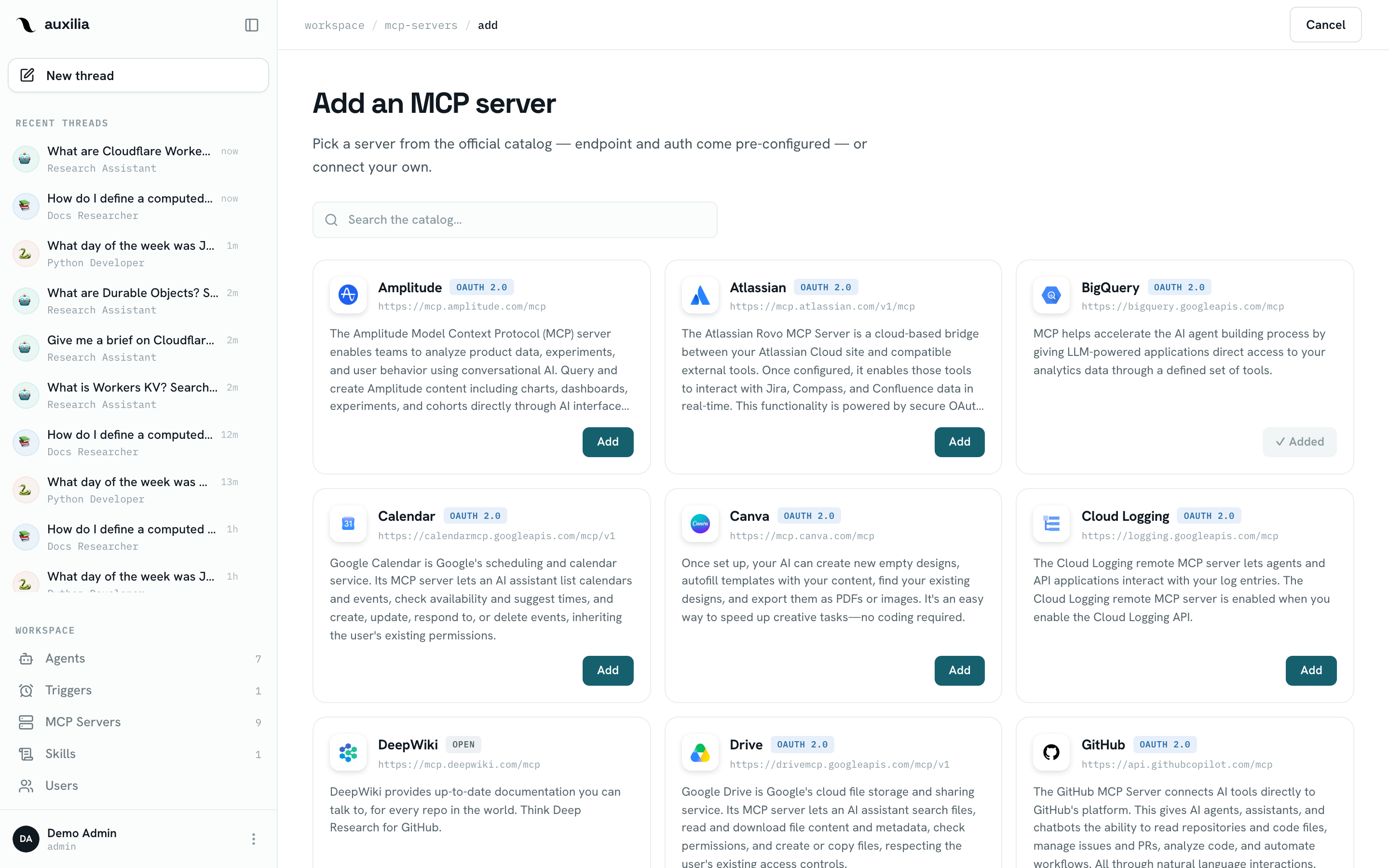
See MCP Servers for the full registration flow and auth options.
7. Add a sandbox (optional)
If you want agents to run code, go to Settings → Sandboxes, click Add sandbox and register an OpenSandbox controller, a Daytona API key or a Cloud Run sandbox gateway. See Sandbox.
8. Create an agent
- Go to Agents → New agent
- Set a name, emoji, and color
- Write the instructions (system prompt)
- Click Add tool to bind one or more MCP servers — and a sandbox, if you added one
- Click Create agent, then Test in chat and send a message
Next steps
- Build Agents — configuration, tools & permissions, sandbox, skills, subagents, triggers
- Deploy & Configure — move from local to production, add user management, MCP servers, Slack, Langfuse
- Tutorials — trigger agents from Slack, from HTTP, from schedulers, or inside a custom UI