Use auxilia from n8n & Cloud Scheduler
Agents are most useful when they don’t wait for someone to open a chat window. This tutorial shows the ways to put them into motion automatically: the built-in Triggers for schedules, automation platforms (n8n, Zapier, Make) for event-driven runs, and an external scheduler (Google Cloud Scheduler, cron) when the schedule has to live outside auxilia.
The last two use the same underlying mechanism — two HTTP requests — so if you haven’t already, skim Trigger agents over HTTP first to understand the shape of the call.
Pattern 0 — Built-in Triggers (start here for schedules)
If your need is recurring — a daily digest, a weekly report, a monthly audit — you don’t need any external tool. Triggers run an agent on a cron schedule from inside auxilia:
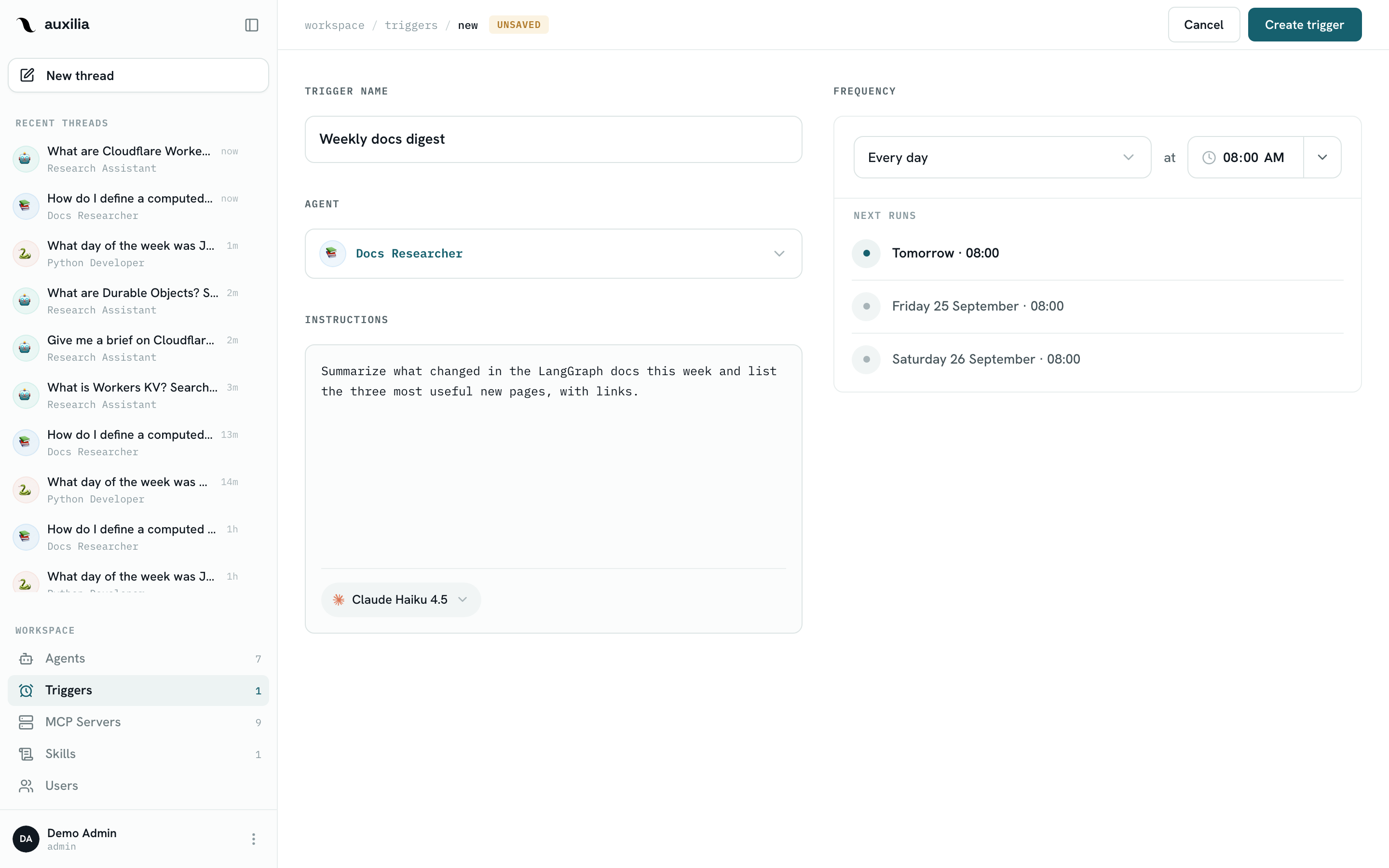
- Open Triggers in the sidebar and click New trigger
- Give it a name, pick the agent and the model, and write the instructions — the message sent to the agent on every run
- Build the schedule — presets from Every day and Weekdays (Mon–Fri) to Once a month, or a Custom cron expression — and pick the timezone; the Next runs preview shows the next firings before you save
- Click Create trigger
Each firing creates a new thread (badged as a scheduled run) and a background run executed as you — with your MCP connections and your agent permissions. From the trigger’s page you can pause it with the Active switch, fire it immediately with Run now, and browse the threads it produced.
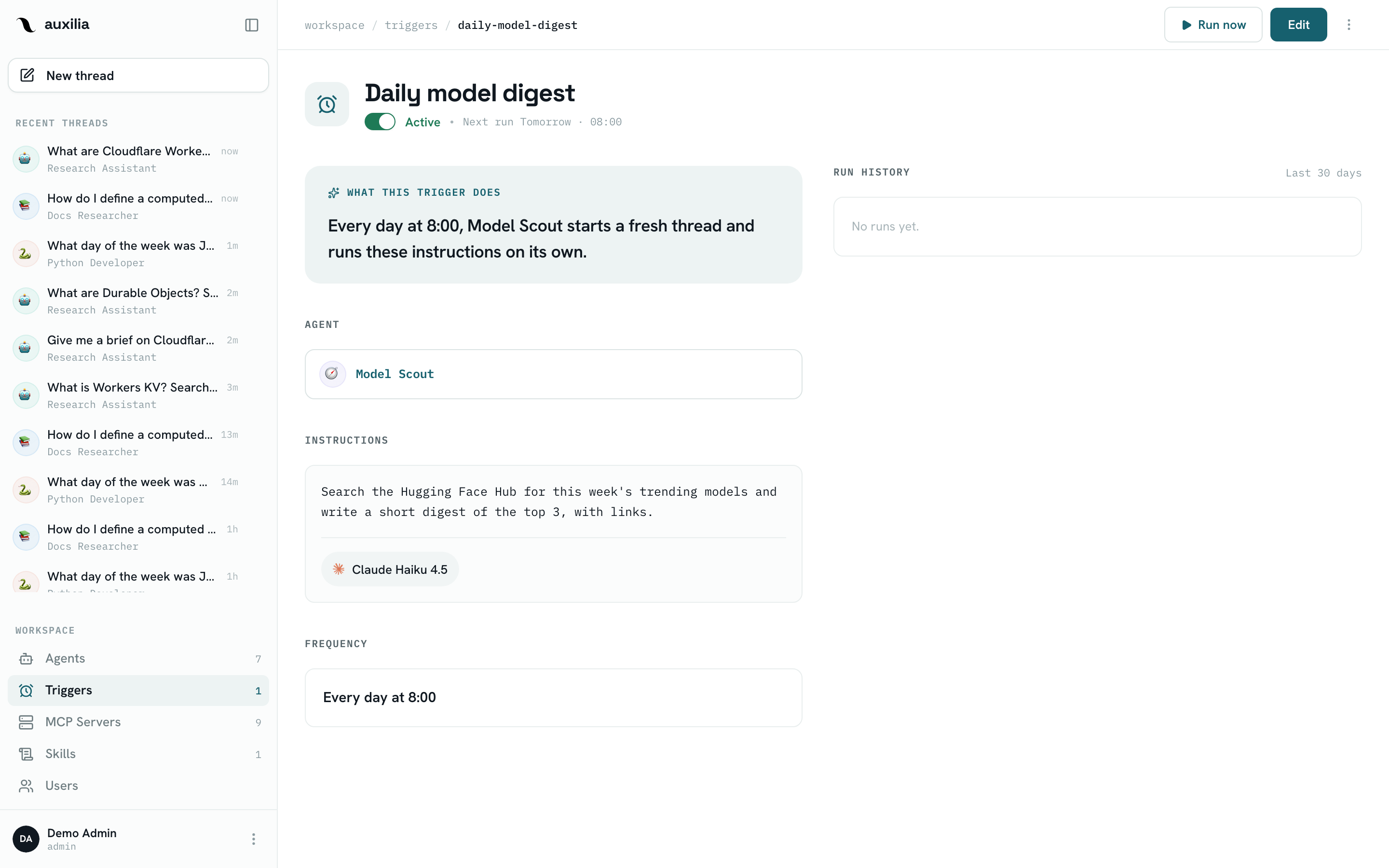
Everything below still applies to triggers: give the agent concrete instructions, keep its tools on Always allow (nobody is there to approve), and let the agent post its result somewhere useful (Slack, a sheet, a doc) through its MCP tools. See Triggers for the full reference.
Reach for an external scheduler only when the schedule must be owned elsewhere — for example when the run is one step of a larger pipeline that already lives in n8n or Cloud Scheduler.
Pattern 1 — Automation workflows (n8n, Zapier, Make)
Automation tools are ideal for event-driven agents: when something happens in system A, ask an agent to do something about it, then push the result into system B.
Example: auto-respond to HubSpot form submissions
Goal: when someone fills in a contact form, have an agent draft a tailored response and post a suggestion in Slack for a sales rep to review.
The workflow nodes:
- Trigger — HubSpot “New form submission”
- Action: HTTP Request — create a thread:
POST https://your-auxilia-host/api/backend/threads/- Header:
Authorization: Bearer <your PAT> - Body:
{ "agent_id": "your-crm-agent-id", "model_id": "claude-haiku-4-5" } - Keep
{{ $json.id }}from the response — that’s the thread id
- Header:
- Action: HTTP Request — run the agent:
POST https://your-auxilia-host/api/backend/threads/{{ $json.id }}/runs/invoke- Same header
- Body:
{ "input": { "messages": [{ "type": "human", "content": "A prospect filled out our contact form. Name: {{contact.firstname}} {{contact.lastname}}, company: {{contact.company}}, question: {{form.message}}. Draft a short, friendly response and flag the account priority." }] } } - The agent’s answer is
{{ $json.content }}in the response
- Action: Slack “Post message” — post
{{ $json.content }}to#sales-inbound
The whole thing runs in a few seconds and scales however your automation tool scales. Store the PAT in the tool’s credential store, never in the node body.
Good candidates for this pattern
- New support ticket → agent summarizes and suggests a reply
- New Stripe customer → agent enriches the record from their website and writes it to Salesforce
- Failed CI run → agent reads the logs, summarizes likely cause, comments on the PR
- Calendar event ends → agent pulls notes from the doc and updates the CRM
Tips
- Give the agent structured data in the prompt — JSON-like text, template variables. The LLM handles it fine.
- Want a value, not prose? Add an
output_schemato the invoke body and readstructured_response— see Structured output. - Use tool approvals carefully — if this workflow runs unattended, the agent’s tools need to be on Always allow, or the run pauses for a human and the request fails with
Run did not complete (interrupted). - Start with a non-destructive agent — one that drafts and suggests, then graduate to one that writes back to systems once you trust the output.
- One thread per event is the simplest mental model. Reuse a thread only when later events genuinely continue the same conversation.
Pattern 2 — External schedulers (Cloud Scheduler, cron)
When the schedule has to live outside auxilia, any scheduler that can send HTTP requests works. Because a run needs a thread first, put a tiny script in the middle — Cloud Scheduler can’t chain two requests on its own.
Example: daily pipeline report in Slack
Goal: every weekday at 8am, have the CRM agent summarize yesterday’s deal activity and post it to #sales-stand-up.
The script (a Cloud Run job, a Cloud Function, or a plain cron host):
#!/usr/bin/env bash
set -euo pipefail
HOST=https://your-auxilia-host/api/backend
AUTH="Authorization: Bearer $AUXILIA_PAT"

THREAD_ID=$(curl -sS -X POST "$HOST/threads/" -H "$AUTH" -H "Content-Type: application/json" \
  -d '{"agent_id": "your-crm-agent-id", "model_id": "claude-haiku-4-5"}' | jq -r .id)

curl -sS -X POST "$HOST/threads/$THREAD_ID/runs/invoke" -H "$AUTH" -H "Content-Type: application/json" \
  -d '{"input": {"messages": [{"type": "human", "content": "Summarize yesterday'\''s deal activity from HubSpot — new deals, stage changes, closed-won. Post the summary to #sales-stand-up with a one-line highlight at the top."}]}}' \
  | jq -r .content
Using Google Cloud Scheduler: create a job with schedule 0 8 * * 1-5, timezone Europe/Paris, and target the script (an HTTP target on your Cloud Run job or function). Keep the PAT in Secret Manager and inject it as AUXILIA_PAT.
If the agent has the Slack MCP server bound and the right tools on Always allow, the posting happens inside the agent — you don’t need a second step.
Good candidates for scheduling
- Daily CRM / pipeline digest
- Weekly “what shipped” summary from GitHub + Linear
- Monthly cost roll-up from billing MCP servers
- Quarterly KPI report to a leadership Slack channel
Every one of these is also a one-form job for a built-in Trigger, which needs no script and no secret handling.
Tips
- Think about time zones — external schedulers normally run in UTC; set the zone explicitly or the 8am job fires at a surprising hour. Built-in triggers take a timezone up front.
- Use idempotent agents — if the scheduler retries on failure, you don’t want duplicate posts. Tell the agent to check for an existing post before creating a new one.
- Monitor through Langfuse — scheduled runs don’t have a human watching, so observability is how you catch regressions
Combining patterns
Nothing stops you from mixing them. A common one:
- A Trigger wakes up every morning and asks an agent to check for overdue invoices
- The agent finds the list and calls a webhook into your n8n workflow (through an n8n MCP server bound to the agent)
- The workflow does the fan-out: one Slack message per overdue invoice in the right channel, one email per finance contact
This way the agent’s “intelligence” lives in auxilia (prompt, tools, model choice, schedule) and the “plumbing” lives in n8n — each tool doing what it’s best at.